Buying guide Updated 2026
The Best Z-Wave Door Locks
A Z-Wave lock talks to a dedicated low-power radio hub instead of your Wi-Fi router - that's the whole point. It means the lock keeps working locally during an internet or Wi-Fi outage, it doesn't compete with your router for airtime, and it tends to get more months out of a set of batteries than a Wi-Fi lock does. The trade-off is that you need a hub: a Ring Alarm base station, a Samsung SmartThings hub, a Hubitat, or a security panel like Alarm.com that already speaks Z-Wave. If you have one, or you're building a system around one, a Z-Wave deadbolt is the more reliable way to add a smart lock to it. For most Ring Alarm or SmartThings households, the Schlage BE469ZP Connect ($239-$300) is the safest pick - it's the longest-running Z-Wave deadbolt on the market and it's on Ring's own certified-locks list. Want to drop the key entirely? The Yale Assure Lock 2 Key-Free Touchscreen ($190-$210) is fully keyless. Prices and stock verified August 2026.
At a glance - 4 Z-Wave door locks compared (prices verified August 2026)
| Lock | Best for | Approx. price | Type |
|---|---|---|---|
| Schlage BE469ZP Connect Check price | Best overall - Ring Alarm / SmartThings households | $239-300 | Keyed touchscreen deadbolt |
| Yale Assure Lock 2 Key-Free Touchscreen Check price | Best keyless entry | $190-210 | Keyless touchscreen deadbolt |
| Kwikset Home Connect 620 Check price | Best value | $149-168 | Keyed keypad deadbolt |
| Ultraloq Bolt Z-Wave Check price | Newest radio - Home Assistant / large homes | $180 | Keyed keypad deadbolt |
Why choose Z-Wave over Wi-Fi
A Wi-Fi smart lock connects straight to your router, which is convenient until your internet goes down or your router is on the far side of the house from the front door - then the lock's remote features go with it. Z-Wave locks don't touch your Wi-Fi at all. They run on a separate, dedicated low-power radio (908.42 MHz in the US) that talks only to a hub, and every powered Z-Wave device on the network can repeat the signal for the next one, building a mesh that reaches further than a single Wi-Fi router would. Because the hub - not the cloud - does the talking, the lock keeps responding to its keypad, its key, and hub-based automations even when your internet connection is out; only remote access from outside the house needs the internet back. The lower-power radio is also the reason Z-Wave locks tend to post longer battery-life numbers than Wi-Fi locks: Schlage states up to a year on 4 AA batteries for the BE469ZP Connect and Kwikset states 12 months for the Home Connect 620, against roughly 6-8 months on comparable Wi-Fi locks like the Schlage Encode Plus or Wyze Auto-Lock Bolt v2.
The trade-off: you need a hub
None of the locks on this page will talk to your phone on their own. Z-Wave is a closed radio protocol - the lock pairs with a hub, and the hub's app is what gives you remote lock/unlock, activity logs, and integration with cameras or an alarm system. That hub is most often one you already have or already want: a Ring Alarm base station, a Samsung SmartThings hub, a Hubitat Elevation, or a professionally monitored security panel like Alarm.com. If you don't have any of those and don't plan to get one, a Z-Wave lock is the wrong tool - a Wi-Fi lock connects directly and skips the extra hardware. See our broader roundup of the best smart locks if you're choosing your first one and haven't settled on a hub yet.
How to choose
- Start from the hub you already have. Ring Alarm officially supports more than 35 Z-Wave locks, and its certified "Works With Ring" list names exactly three brands: Schlage, Kwikset, and Yale - which covers the first three picks below. The Ultraloq Bolt Z-Wave makes no Ring claim at all; Ultraloq positions it for Alarm.com, Home Assistant, and SmartThings households instead. If Ring Alarm is your hub, pick from the first three.
- Keyed vs. keyless: the Schlage BE469ZP, Kwikset Home Connect 620, and Ultraloq Bolt Z-Wave all keep a physical key as a fallback if the battery dies or the electronics fail. The Yale Assure Lock 2 Key-Free Touchscreen has no key cylinder at all - simpler if you never want to carry a key again, but there's no mechanical backup if the keypad stops responding.
- Want fingerprint entry? Z-Wave is currently the wrong protocol for it. Ultraloq's fingerprint U-Bolt Pro Z-Wave reads "Currently unavailable" on Amazon as of August 2026, and the company's new Bolt Pro flagship moved to Matter-over-Thread rather than Z-Wave - so there's no fingerprint Z-Wave lock we can verify as in stock. If biometric entry matters more than hub integration, see our best fingerprint door locks roundup (those are Wi-Fi locks).
- Radio generation: the Ultraloq Bolt Z-Wave runs the newest 800-series Z-Wave Long Range chip (Silicon Labs ZG28) and Kwikset sells a 700-series Long Range version of the Home Connect 620 - both reach further than classic Z-Wave Plus, which matters for a detached garage or a big house. The Schlage and Yale picks are standard Z-Wave Plus.
- Budget: the Kwikset Home Connect 620 is $30-90 cheaper than the other three at $149-168. It gets there by skipping the touchscreen (physical keypad instead) and by being Kwikset's older Z-Wave line rather than its current Matter-focused flagship - still actively sold and supported, just not the newest technology in Kwikset's catalog.
Z-Wave, Zigbee, and Matter aren't the same thing
Z-Wave is a separate, proprietary-but-standardized protocol stewarded by the Z-Wave Alliance and Silicon Labs, and it does not talk directly to Zigbee devices or to Matter controllers. Matter, the newer unified smart-home standard backed by Apple, Google, Amazon, and others, currently runs over Wi-Fi, Thread, or Ethernet - not Z-Wave. As of 2026 there's no plug-in dongle that turns a Z-Wave lock into a Matter device; the only path is a hub that bridges both, like an Aqara Hub M3 or a newer Hubitat controller. If your long-term plan is an all-Matter home, none of the four locks below join that network directly - they need a bridging hub in between.
The picks
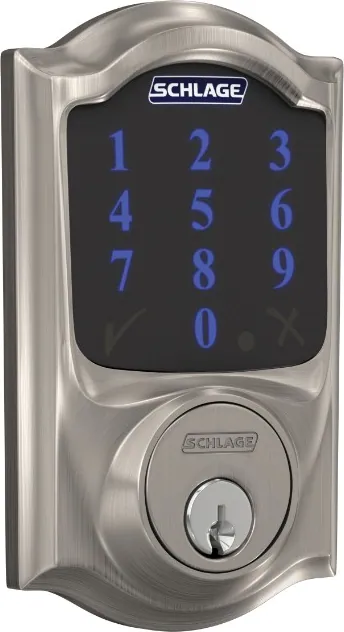
Image: Schlage
1. Schlage BE469ZP Connect Smart Deadbolt (Camelot, Z-Wave Plus)
The longest-running Z-Wave deadbolt on the market, and the safest bet if you already run Ring Alarm or SmartThings: it's on Ring's own list of Works-With-Ring certified locks, and it carries an ANSI/BHMA A156.40 Grade AAA residential rating. Schlage states up to a year of battery life on 4 AA batteries. It's keyed - a physical key cylinder still opens the door if the battery dies - and it includes a built-in alarm that can flag tampering or forced entry. Home Depot prices the Camelot Satin Nickel trim at $257.39, with other trims and finishes running up to $300.
Pros
- On Ring's own certified Works-With-Ring locks list
- Up to 1 year of battery life on 4 AA batteries (Schlage's own figure)
- ANSI/BHMA Grade AAA residential rating
- Keyed - physical key cylinder as backup
- Built-in tamper/forced-entry alarm
Cons
- Needs a Z-Wave hub for any remote or app access - no built-in Wi-Fi
- Priciest of the four picks by finish/trim
- Touchscreen keypad, not fingerprint

2. Yale Assure Lock 2 Key-Free Touchscreen with Z-Wave
This is the Key-Free configuration of Yale's Assure Lock 2 - there is no key cylinder anywhere on it, so entry is by touchscreen code or through a paired Z-Wave hub's app. Yale states it works with Ring Alarm, Samsung SmartThings, and dozens of other Z-Wave systems, and DoorSense reports whether the actual door is open or closed, not just the bolt position. It's a distinct SKU (and a distinct catalog entry here) from the Wi-Fi version of the Assure Lock 2 - the radio module, not just the software, is different. Yale's own store prices its Z-Wave touchscreen models $189.99-$209.99 by finish, and a Z-Wave upgrade module for existing Assure Lock 2 owners is $99.99 separately.
Pros
- Fully keyless - no key cylinder to lose track of or pick
- Yale states Ring Alarm and SmartThings compatibility, among "dozens" of Z-Wave systems
- DoorSense reports actual door position, not just bolt state
- Cheaper than the Schlage BE469ZP Connect
Cons
- No mechanical key backup - a dead battery or stuck keypad has no bypass but the app/hub
- Runs on 4 AA batteries with no independently stated battery-life figure as clean as Schlage's
- Needs a Z-Wave hub for remote access, same as every lock on this page

3. Kwikset Home Connect 620 Keypad Smart Lock (Z-Wave)
The cheapest lock here, and still a current, actively sold Kwikset product - it's just not Kwikset's newest technology. Kwikset's current flagship push is toward Matter (Halo Select); Home Connect 620 is the model the company keeps selling specifically for Z-Wave/hub households, and it's explicitly labeled compatible with Ring Alarm and Samsung SmartThings on its own retail listings. It includes a physical backup key with SmartKey re-key technology and states 12 months of battery life. Home Depot lists the Z-Wave Long Range Satin Nickel Traditional at $149.00, with other finishes up to about $167.88.
Pros
- Lowest price of the four by $30-90
- 12-month battery life claim
- Keyed with SmartKey re-key backup
- Explicitly labeled Ring Alarm and SmartThings compatible on Kwikset's own listings
Cons
- Older Z-Wave line - Kwikset's current smart-lock focus is now Matter, not Z-Wave
- Physical keypad, not a touchscreen
- No independently confirmed ANSI/BHMA grade found for this specific model
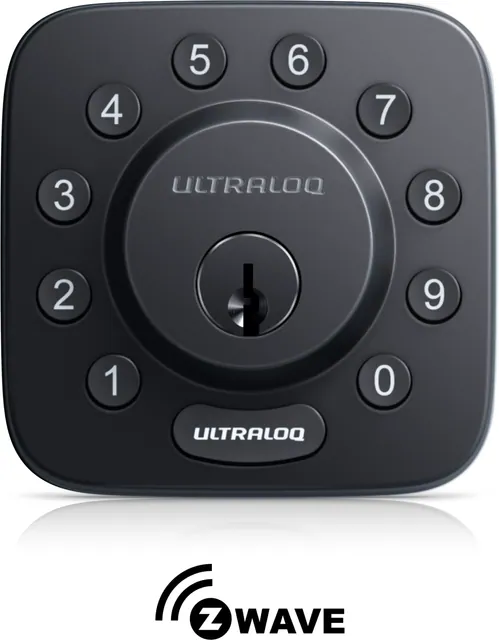
Image: Ultraloq
4. Ultraloq Bolt Z-Wave
The most modern Z-Wave hardware in this list: it runs 800-series Z-Wave Long Range on the Silicon Labs ZG28 chip, which Ultraloq aims at large homes, detached garages, and rentals where classic Z-Wave range gets flaky. Entry is by keypad code, app (through your hub), auto lock/unlock, or a physical backup key, and the body is BHMA Grade 1 certified zinc alloy with an IP65 weather rating. Ultraloq positions it for Alarm.com, Home Assistant, and SmartThings households - it makes no Ring Alarm claim, so Ring users should pick from the other three. Ultraloq's own store lists it at $179.99.
Pros
- Newest radio here - 800-series Z-Wave Long Range (Silicon Labs ZG28)
- BHMA Grade 1 certification and IP65 weather resistance
- Keyed - physical backup key included, plus auto lock/unlock
- SmartStart setup; ~10-minute screwdriver install per Ultraloq
Cons
- No Ring Alarm support claimed - Alarm.com / Home Assistant / SmartThings are the stated platforms
- Physical keypad, no touchscreen and no fingerprint (Ultraloq's fingerprint Z-Wave model is currently unavailable)
- Newer listing with a shorter track record than the Schlage or Kwikset
Our pick: Schlage BE469ZP Connect
If you already have, or plan to get, a Ring Alarm, SmartThings, or Alarm.com system, the Schlage BE469ZP Connect is the default-right answer - it's officially certified for Ring Alarm, it posts the best battery-life figure of the group, and it carries the highest security grade. Want to lose the key entirely? Step up to the Yale Assure Lock 2 Key-Free Touchscreen. On a tight budget, the Kwikset Home Connect 620 does the same core job - Z-Wave keypad entry, Ring/SmartThings compatible - for $30-90 less. And if your hub is Home Assistant or Alarm.com, or the lock has to reach a detached garage, the Ultraloq Bolt Z-Wave's 800-series Long Range radio is the most modern Z-Wave hardware of the four.
We may earn a commission on qualifying purchases made through links on this page, at no extra cost to you. It never affects which product we recommend. Learn more.
Product prices and availability are accurate as of the date/time indicated and are subject to change. Any price and availability information displayed on Amazon.com at the time of purchase will apply to the purchase of this product. Certain content that appears on this site comes from Amazon. This content is provided ‘as is’ and is subject to change or removal at any time.
Frequently asked questions
- Do Z-Wave locks need a hub?
- Yes, always. A Z-Wave lock has no Wi-Fi or Bluetooth-to-phone connection of its own - it only speaks Z-Wave, which is a hub-to-device protocol. You need a Z-Wave hub (a Ring Alarm base station, a Samsung SmartThings hub, a Hubitat Elevation, or a compatible security panel like Alarm.com) to get remote lock/unlock, activity history, or smart-home automations. Without a hub, the lock still works as a standalone keypad or key-entry deadbolt - you just lose the remote and app features.
- Do Z-Wave locks really have better battery life than Wi-Fi locks?
- Generally yes, though the gap is real rather than dramatic. Z-Wave's dedicated low-power radio is more efficient than a lock constantly maintaining a Wi-Fi connection to your router. Manufacturer figures bear this out: Schlage states up to 1 year on the BE469ZP Connect and Kwikset states 12 months on the Home Connect 620, both Z-Wave, against roughly 6 months for the Wi-Fi Schlage Encode Plus and up to 8 months for the Wi-Fi Wyze Auto-Lock Bolt v2. It's a real advantage, not a night-and-day one.
- Will a Z-Wave lock work with my Ring Alarm?
- Ring states its Alarm system supports more than 35 Z-Wave locks from Schlage, Kwikset, and Yale, and publishes an official "Works With Ring" certified-locks list. The Schlage BE469ZP Connect and Kwikset Home Connect 620 in this roundup are both explicitly labeled Ring Alarm compatible by their own retailers, and Yale's Z-Wave Assure Lock 2 line is covered under Yale's broader Ring Alarm compatibility. The Ultraloq Bolt Z-Wave is the exception: Ultraloq makes no Ring claim for it (Alarm.com, Home Assistant, and SmartThings are its stated platforms), and Ultraloq isn't on Ring's certified-brand list - so Ring Alarm households should pick from the Schlage, Kwikset, or Yale.
- What's the difference between Z-Wave, Zigbee, and Matter?
- They're three separate wireless protocols that don't talk to each other directly. Z-Wave is a proprietary-but-standardized protocol (stewarded by the Z-Wave Alliance and Silicon Labs) used by locks like the ones on this page. Zigbee is a different low-power mesh protocol used by some other smart-home brands. Matter is the newest unified standard, backed by Apple, Google, Amazon, and others, and as of 2026 it runs over Wi-Fi, Thread, or Ethernet - not natively over Z-Wave or Zigbee. To mix a Z-Wave lock into a Matter-based smart home, you need a hub that bridges the two, like an Aqara Hub M3 or a newer Hubitat controller; there's no direct dongle that converts one protocol into another.
- Should I buy a Z-Wave lock if I don't already have a hub?
- Probably not, unless you're planning to add one anyway. Buying a Z-Wave lock with no hub means you get a functional keypad or fingerprint deadbolt but none of the remote-access features that make a smart lock worth the extra money over a plain deadbolt. If you don't want the added cost and setup of a hub, a Wi-Fi lock - which connects straight to your router - is the simpler choice. See our roundup of the best smart locks for options that don't require a separate hub.
Related
Sources
- Amazon - Schlage BE469ZP CAM 619 Camelot Satin Nickel
- Home Depot - Schlage BE469ZP CAM 619, $257.39
- Schlage - Connect Smart Deadbolt with Z-Wave Plus, product page
- Ring - Integrating Works With Ring Door Locks with Your Ring Alarm (35+ Z-Wave locks, Schlage/Kwikset/Yale)
- Alarm.com - Schlage Z-Wave Plus Touchscreen Deadbolt (BE469ZP) quick start guide
- Amazon - Yale Assure Lock 2 YRD450-ZW2-619 Key-Free Touchscreen, Satin Nickel
- Yale Home - Z-Wave Door Locks for your Smart Home
- Yale Home - Z-Wave Now Available with Yale Assure Lock 2 ($99.99 module, Ring/SmartThings)
- GearBrain - Yale Assure Lock 2 Now Available with Z-Wave Module ($189.99-$209.99)
- Amazon - Kwikset Home Connect 620, Traditional, Satin Nickel, Z-Wave
- Home Depot - Kwikset HomeConnect 620 Z-Wave Long Range, Satin Nickel Traditional, $149.00
- Kwikset - Home Connect 620 Traditional Keypad support page
- Amazon - ULTRALOQ Bolt Z-Wave Deadbolt Smart Lock (800 Series Z-Wave Long Range)
- Ultraloq - Bolt Z-Wave product page ($179.99)
- Amazon - ULTRALOQ Bolt Pro Z-Wave with Fingerprint ID (Currently unavailable as of Aug 2026)
- RemoteLock - Wi-Fi vs. Z-Wave locks explainer (hub requirement, local operation)
- Guardian Protection - What Is Z-Wave (900 MHz mesh, local control during outage)
- Hubitat - Z-Wave Technology overview (local processing, lock support)
- The Ambient - Z-Wave and Matter bridging explainer
Specs and prices are compiled from the sources above and current as of the update date. Availability and pricing change — confirm on the retailer page before buying.