2017 Buick Encore Key Fob Programming
Updated 2026 Programming, battery & replacement fob
You can program a 2017 Buick Encore key fob yourself in a few minutes using a working key or remote, no dealer visit needed. Follow the steps below, then check the battery and the correct replacement fob (with FCC ID and part number) if you need a new one.
This GM vehicle comes in two ignition types — match yours: a regular key ignition (transponder or flip key) or push-button start (smart key). Each has a method for two working keys and one for when you have one or none.
Before you start
- All your keys — working and new — with you
- The new key cut beforehand
Regular ignition — with two working keys
- 1Insert an already-programmed key and turn to ON/RUN.
- 2Turn to LOCK/OFF and remove the key.
- 3Within 5 seconds, insert the second programmed key and turn to ON/RUN.
- 4Turn to LOCK/OFF and remove the key.
- 5Within 5 seconds, insert the new key and turn to ON/RUN. The security light goes out once it's programmed.
- 6Repeat from step 1 for additional keys (up to 8 total).
Regular ignition — with one or no working key
Takes about 30 minutes. Not available in Canada.
- 1Insert the new key and turn to ON/RUN — the security light comes on.
- 2Wait 10 minutes until the security light goes out.
- 3Turn to LOCK/OFF.
- 4Repeat the ON/RUN, 10-minute wait, and OFF two more times. After the third, turn to ON/RUN — the new key is programmed and all previous keys stop working.
- 5To program a second key, turn OFF, insert it, and turn to ON/RUN. For more, use the two-working-keys method above.
Push-button start — with two working smart keys
- 1Remove the emergency key blade from one of the working smart keys.
- 2Place both working smart keys in the cupholder.
- 3Insert the emergency key blade into the driver's-door lock cylinder and turn counterclockwise to unlock five times within 10 seconds. The display shows READY FOR REMOTE #2.
- 4Place the new smart key in the transmitter pocket — center console for Cadillac, front cupholder for Chevrolet, GMC, and Buick.
- 5Press ENGINE START/STOP. When recognized, the display is ready for the next key.
- 6Take the key out and press Lock or Unlock on it. To add more, repeat the last three steps, then press and hold ENGINE START/STOP about 12 seconds to exit.
Push-button start — with one or no smart key
About 30 minutes; not available in Canada. With no working key, have the new blade cut by a locksmith first.
- 1Remove the key blade from your existing or new smart key and insert it into the driver's-door lock cylinder. Turn counterclockwise to unlock five times within 10 seconds. The display shows READY FOR REMOTE.
- 2Wait about 10 minutes until it reads PRESS ENGINE START BUTTON TO LEARN, then press ENGINE START/STOP (it shows REMOTE LEARN PENDING).
- 3Repeat that sequence two more times. After the third, all previous keys stop working and the display shows READY FOR REMOTE #1.
- 4Place the new smart key in the transmitter pocket, press ENGINE START/STOP, then take it out and press Lock or Unlock.
- 5To add another key, repeat the last step's actions, then press and hold ENGINE START/STOP about 12 seconds to exit.
Replacement key fobs
Find your key type below, then match the FCC ID printed on the back of your existing fob — or, for a plain transponder key, the blank code — to be sure of the right part.
Proximity Key
Stays in your pocket — the car unlocks and starts without inserting a key.
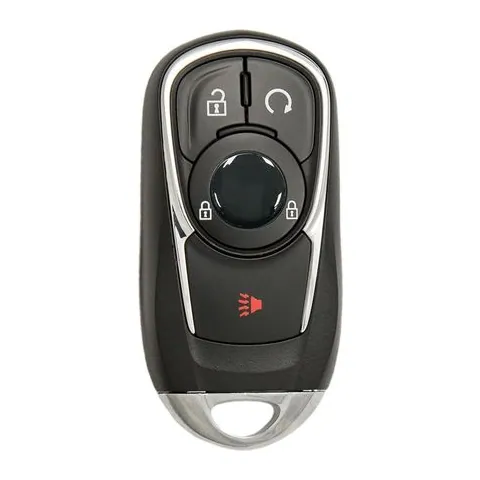
3/4-button Proximity Key
Find on Amazon- FCC ID
- HYQ4AA
- OE part #
- 13506665, 13508417, 13532383, 13532390, 5944125, 5947338
- Frequency
- 315 MHz
- Chip
- PHILIPS ID 46 GM EXT
Remote Head Key
2 versionsOne piece: a cut metal blade with the lock/unlock buttons built into the head.
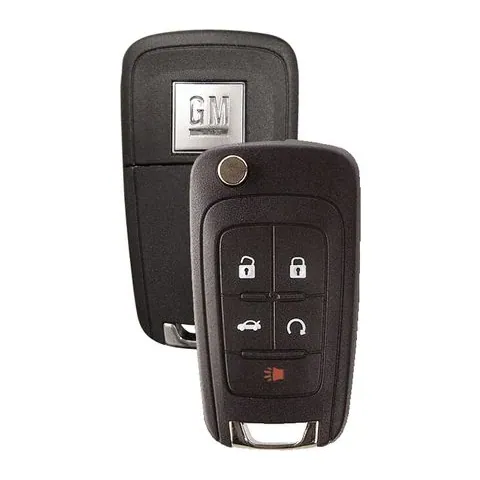
4/5-button Remote Head Key
Find on Amazon- FCC ID
- OHT05918179, P4O9MK74946931
- OE part #
- 13500224, 13500225, 13500318, 13500319, 13504202, 13504203 +19 more
- Frequency
- 315 MHz
- Chip
- PHILIPS ID 46
3/4/5-button Remote Head Key
Find on Amazon- FCC ID
- AVL-B01T1AC, AVL-B01T2AC, KR55WK50073, OHT01060512, V2T01060512, V2T01060514
- OE part #
- 13500221, 13500222, 13500226, 13500227, 13501513, 13501514 +56 more
- Frequency
- 315 MHz
- Chip
- PHILIPS ID 46 GM EXT
Photos show the OEM part for each number listed. Aftermarket replacements sold online are often slightly different in appearance — the FCC ID, not the shape, is what determines whether a fob will work with your car.
2017 Buick Encore key fob battery
Your 2017 Buick Encore key fob uses a CR2032 3V lithium coin cell. A fresh one typically lasts 3–5 years.
Find CR2032 batteries on AmazonHow to replace the battery
- 1 Slide the release latch and pull the metal emergency key out of the fob.
- 2 Use that key (or a coin) to pry the two halves apart at the seam.
- 3 Lift out the old coin cell — note which side faces up.
- 4 Drop in the new battery the same way (printed + side usually faces the back cover).
- 5 Press the case back together until it clicks, then test lock/unlock and push-to-start.
Battery tips
- Use a fresh, name-brand 3V lithium cell — bargain cells drain quickly.
- Even with a dead fob battery you can usually still start the car by holding the fob against the start button — check your owner's manual.
- If the fob still won't work after a new battery, it may need re-syncing or programming.
We may earn a commission on qualifying purchases made through links on this page, at no extra cost to you. It never affects which product we recommend. Learn more.
Rather hire a pro?
See what it actually costs, broken out by dealer, locksmith, and DIY: