2014 Chevrolet Captiva-Sport Key Fob Programming
Updated 2026 Programming, battery & replacement fob
You can program a 2014 Chevrolet Captiva-Sport key fob yourself in a few minutes using a working key or remote, no dealer visit needed. Follow the steps below, then check the battery and the correct replacement fob (with FCC ID and part number) if you need a new one.
On this GM vehicle you can program a new transponder key yourself using a key that already starts the engine. It takes under a minute per key.
Before you start
- A key that already starts the engine
- Your new key, already cut
- 1Insert a working key that starts the engine and start the engine.
- 2Turn the key to OFF and remove it.
- 3Within 10 seconds, insert the new key and turn it to ON — do not start the engine.
- 4Wait for the security light to go out. That means the key is programmed (it can happen so fast you may not see the light).
- 5To program another key, repeat from step 1.
Takes under a minute per key.
Tips & troubleshooting
- If your vehicle has no security light (some 2004–2007 Grand Prix, Bonneville, and Impala), leave the new key in the ON position for 10 minutes and 45 seconds to be sure it programs.
Replacement key fobs
Find your key type below, then match the FCC ID printed on the back of your existing fob — or, for a plain transponder key, the blank code — to be sure of the right part.
Remote
A separate key fob that only handles locking and unlocking.
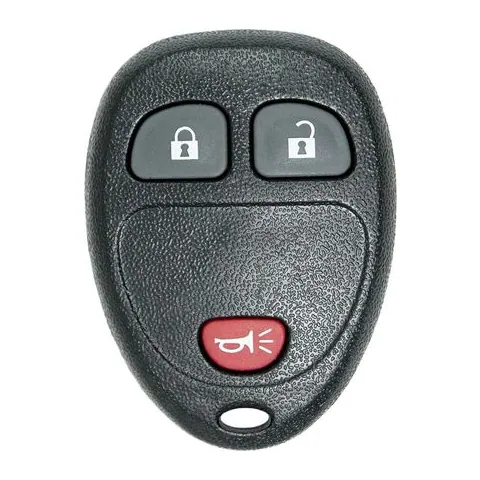
3/4/6-button Remote
Find on Amazon- FCC ID
- KOBGT04A, OUC60221, OUC60270
- OE part #
- 15857834, 15857837, 15913420, 15913421, 20868672, 20868852 +13 more
- Frequency
- 315 MHz
Transponder Key
A cut metal key with a chip in the head. No buttons.
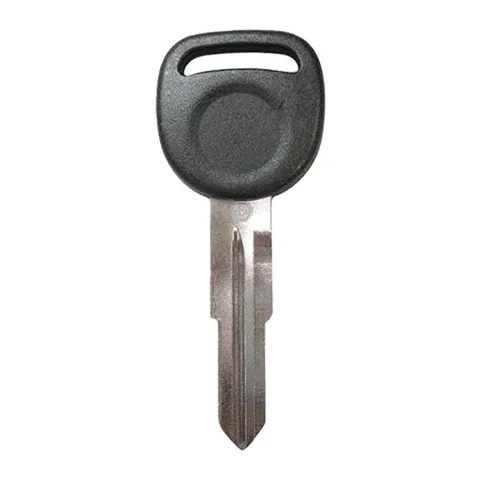
Transponder Key
Find on Amazon- Key blank
- B114R
- OE part #
- 7011685, B114R
- Chip
- PHILIPS ID 46
Photos show the OEM part for each number listed. Aftermarket replacements sold online are often slightly different in appearance — the FCC ID, not the shape, is what determines whether a fob will work with your car.
2014 Chevrolet Captiva-Sport key fob battery
Your 2014 Chevrolet Captiva-Sport key fob uses a CR2032 3V lithium coin cell. A fresh one typically lasts 3–5 years.
Find CR2032 batteries on AmazonHow to replace the battery
- 1 Find the seam or small slot on the edge of the remote.
- 2 Twist a coin or small flathead in the slot to split the case open.
- 3 Remove the old coin cell and note the + side.
- 4 Fit the new battery with the + side matching, then close the case.
- 5 Press a button to confirm the LED lights, then test at the car.
Battery tips
- Use a fresh, name-brand 3V lithium cell — bargain cells drain quickly.
- Try not to touch both faces of the new battery; skin oils shorten its life.
- If the remote still doesn't work after a new battery, it may need re-syncing or programming.
We may earn a commission on qualifying purchases made through links on this page, at no extra cost to you. It never affects which product we recommend. Learn more.
Rather hire a pro?
See what it actually costs, broken out by dealer, locksmith, and DIY: