2015 Chevrolet Malibu Key Fob Programming
Updated 2026 Programming, battery & replacement fob
You can program a 2015 Chevrolet Malibu key fob yourself in a few minutes using a working key or remote, no dealer visit needed. Follow the steps below, then check the battery and the correct replacement fob (with FCC ID and part number) if you need a new one.
On this GM vehicle you can add a new key yourself using a key that already starts the engine. It adds keys without erasing the ones you have. The new key must be cut first.
Before you start
- A key that already starts the engine
- Your new key, already cut
- 1Insert the original, already-programmed key and start the engine.
- 2After it starts, turn the key off and remove it.
- 3Within 10 seconds, insert the new key and turn it to ON (don't start the engine).
- 4The security light goes out once the key is programmed (it can be too quick to see). No security light? Wait 10 minutes and 45 seconds.
- 5Repeat from step 1 for additional keys.
Replacement key fob
Find your key type below, then match the FCC ID printed on the back of your existing fob — or, for a plain transponder key, the blank code — to be sure of the right part.
Remote Head Key
One piece: a cut metal blade with the lock/unlock buttons built into the head.
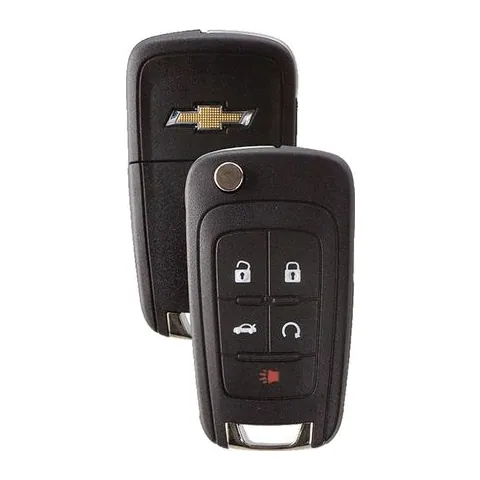
4/5-button Remote Head Key
Find on Amazon- FCC ID
- AVL-B01T1AC, AVL-B01T2AC, KR55WK50073, OHT01060512, OHT05918179, P409MK7946931, P4O9MK74946931, V2T01060512, V2T01060514
- OE part #
- 013504254, 13500221, 13500222, 13500224, 13500225, 13500226 +72 more
- Frequency
- 315 MHz
- Chip
- PHILIPS ID 46
Photos show the OEM part for each number listed. Aftermarket replacements sold online are often slightly different in appearance — the FCC ID, not the shape, is what determines whether a fob will work with your car.
2015 Chevrolet Malibu key fob battery
Your 2015 Chevrolet Malibu key fob uses a CR2032 3V lithium coin cell. A fresh one typically lasts 3–5 years.
Find CR2032 batteries on AmazonHow to replace the battery
- 1 Look for a small notch or screw on the side of the fob where the key blade meets the buttons.
- 2 Pry the housing apart with a coin or small flathead (or remove the screw).
- 3 Pop out the old coin cell, noting its orientation.
- 4 Insert the new battery the same way up, then snap the case shut.
- 5 Test the buttons — if they work, you're done.
Battery tips
- Use a fresh, name-brand 3V lithium cell — bargain cells drain quickly.
- Try not to touch both faces of the new battery; skin oils shorten its life.
- If the buttons still don't respond after a new battery, the remote may need re-syncing or programming.
We may earn a commission on qualifying purchases made through links on this page, at no extra cost to you. It never affects which product we recommend. Learn more.
Rather hire a pro?
See what it actually costs, broken out by dealer, locksmith, and DIY: