2015 Ford Escape Key Fob Programming
Updated 2026 Programming, battery & replacement fob
You can program a 2015 Ford Escape key fob yourself in a few minutes using a working key or remote, no dealer visit needed. Follow the steps below, then check the battery and the correct replacement fob (with FCC ID and part number) if you need a new one.
Remote / key fob programming
Programming a remote on this Ford resets every remote for the vehicle, so you reprogram them all together. There are two common methods — try Method A first, and if it doesn't work use Method B. Do not press the brake pedal at any point.
Before you start
- Every remote you want to use with the vehicle
- Your key
Method A
If it won't enter programming mode, try the same steps with the driver's door closed.
- 1Close all doors, then open the driver's door. With it open, press Unlock on the driver's-door panel and insert the key into the ignition.
- 2Turn the ignition from OFF to RUN 8 times within 8 seconds, ending in RUN. The door locks cycle to confirm programming mode. (OFF is where you can remove the key; RUN is just before starting.) If the locks don't cycle, remove the key and start over.
- 3Within 10 seconds, press any button on the first remote. The locks cycle to confirm. If you have only one remote, skip to the last step.
- 4Within 10 seconds, press any button on the next remote; the locks cycle again. Repeat for any other remotes.
- 5Turn the ignition to OFF. The locks cycle once more to end programming mode.
Method B
- 1Fasten your seatbelt and close all doors.
- 2Turn the ignition from OFF to RUN 4 times within 3 seconds.
- 3Turn the ignition OFF. The system chimes to confirm programming mode.
- 4Within 10 seconds, press and hold any button on the first remote until you hear a chime.
- 5Within 10 seconds, press and hold any button on the next remote until it chimes.
- 6Turn the ignition to RUN to exit programming mode.
Tips & troubleshooting
- Work quickly — the steps need to be done in fast succession.
- If you never get the first chime or lock cycle, the car didn't enter programming mode. Remove the key, open and close the door, and start over.
Key programming
You can add a new key to this Ford yourself if you already have two keys that start the engine. The new key must be cut first, and it has to be a genuine key — a cloned hardware-store key won't work.
Before you start
- Two original keys that already start the engine
- Your new key, already cut
- 1Insert one working key into the ignition. Turn it to ON (just shy of starting, engine not cranking) for at least one second, then back to OFF.
- 2Remove that key. Within 10 seconds, insert the second working key, turn to ON for at least one second (no more than ten), then back to OFF and remove it.
- 3Within 20 seconds, insert the new key and turn it to ON. Leave it on for at least one second, then turn back to OFF.
- 4The security light comes on for three seconds — that confirms the new key is programmed.
Tips & troubleshooting
- No two working keys? The key can't be programmed at a hardware store (Ace, Lowe's, Walmart, Home Depot). You'll need an automotive locksmith or dealer.
Replacement key fobs
Find your key type below, then match the FCC ID printed on the back of your existing fob — or, for a plain transponder key, the blank code — to be sure of the right part.
Proximity Key
Stays in your pocket — the car unlocks and starts without inserting a key.
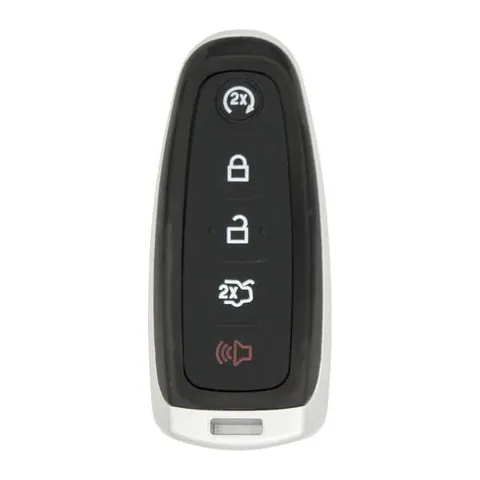
5-button Proximity Key
Find on Amazon- FCC ID
- M3N-5WY8609, M3N5WY8609, M3N5WY8610
- OE part #
- 164-R7995, 164-R8092, 164-R8094, 164-R8103, 5921286, 5921288 +6 more
- Frequency
- 315 MHz
- Chip
- TEXAS 4D 63 80 BIT
Remote Head Key
One piece: a cut metal blade with the lock/unlock buttons built into the head.
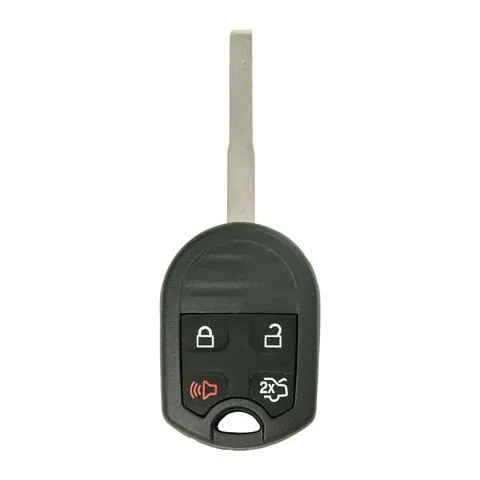
3/4-button Remote Head Key
Find on Amazon- FCC ID
- CWTWB1U793, OUC6000022, OUCD6000022
- OE part #
- 164-R7976, 164-R8007, 164-R8046, 164-R8049, 164-R80505921709, 164-R8423 +9 more
- Frequency
- 315 MHz
- Chip
- TEXAS ID 4D 63 80 BIT
Transponder Key
A cut metal key with a chip in the head. No buttons.
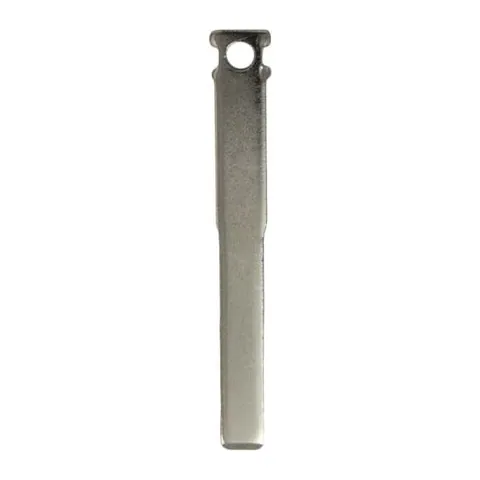
Transponder Key
Find on Amazon- Key blank
- BFD40-I, N5F-A08TAA, N5F-A08TDA
- OE part #
- 164-R7978, 5925267, FD40, HU101, HU101T
Photos show the OEM part for each number listed. Aftermarket replacements sold online are often slightly different in appearance — the FCC ID, not the shape, is what determines whether a fob will work with your car.
2015 Ford Escape key fob battery
Your 2015 Ford Escape key fob uses a CR2025 3V lithium coin cell. A fresh one typically lasts 3–5 years.
Find CR2025 batteries on AmazonHow to replace the battery
- 1 Slide the release latch and pull the metal emergency key out of the fob.
- 2 Use that key (or a coin) to pry the two halves apart at the seam.
- 3 Lift out the old coin cell — note which side faces up.
- 4 Drop in the new battery the same way (printed + side usually faces the back cover).
- 5 Press the case back together until it clicks, then test lock/unlock and push-to-start.
Battery tips
- Use a fresh, name-brand 3V lithium cell — bargain cells drain quickly.
- Even with a dead fob battery you can usually still start the car by holding the fob against the start button — check your owner's manual.
- If the fob still won't work after a new battery, it may need re-syncing or programming.
We may earn a commission on qualifying purchases made through links on this page, at no extra cost to you. It never affects which product we recommend. Learn more.
Rather hire a pro?
See what it actually costs, broken out by dealer, locksmith, and DIY: