BMW Z3 Key Fob Programming
Updated 2026 1997–2002 6 model years
The BMW Z3 key fob has to be programmed by an automotive locksmith or dealer — there is no at-home procedure. Below is the exact replacement fob you need for each model year (FCC ID and part number), the battery it takes, and what programming costs.
Every BMW Z3 model year
| Year | Programming | Key fob | Battery |
|---|---|---|---|
| 2002 |
| Remote Head Key, Remote · 2/3-button | CR2025 battery on Amazon |
| 2001 |
| Remote Head Key, Remote · 2/3-button | CR2025 battery on Amazon |
| 2000 |
| Remote · 2-button | CR2032 battery on Amazon |
| 1999 |
| Remote Head Key, Remote · 2/3-button | CR2016 battery on Amazon |
| 1998 |
| Remote Head Key, Remote · 2/3-button | CR2016 battery on Amazon |
| 1997 |
| Remote Head Key, Remote · 2/3-button | CR2016 battery on Amazon |
2001–2002 BMW Z3
Remote / key fob programming
This remote can't be programmed with a do-it-yourself procedure. The vehicle needs a diagnostic tool connected to its OBD port to pair a new remote, so a replacement has to be set up by an automotive locksmith or a dealer.
Order the correct replacement remote below — match the FCC ID on your current fob first — then have a local automotive locksmith or the dealer program it to your vehicle.
Key programming
This key fob can't be programmed with a do-it-yourself procedure. The vehicle needs a diagnostic tool connected to its OBD port to pair a new fob, so a replacement has to be set up by an automotive locksmith or a dealer.
Order the correct replacement fob below — match the FCC ID on your current fob first — then have a local automotive locksmith or the dealer program it to your vehicle.
Replacement key fobs
Find your key type below, then match the FCC ID printed on the back of your existing fob — or, for a plain transponder key, the blank code — to be sure of the right part.
Remote Head Key
One piece: a cut metal blade with the lock/unlock buttons built into the head.
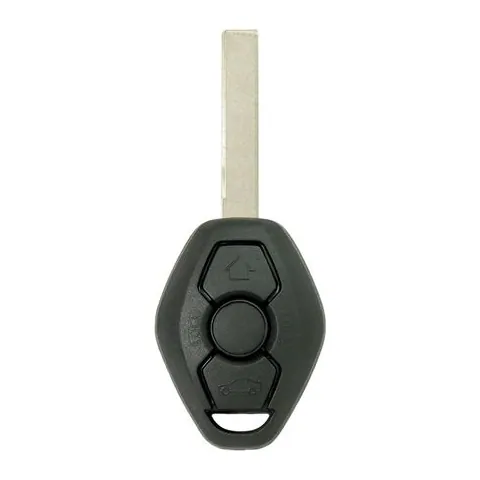
3-button Remote Head Key
Find on Amazon- FCC ID
- LX8FZV
- OE part #
- 6955750
- Frequency
- 315 MHz
Remote
A separate key fob that only handles locking and unlocking.
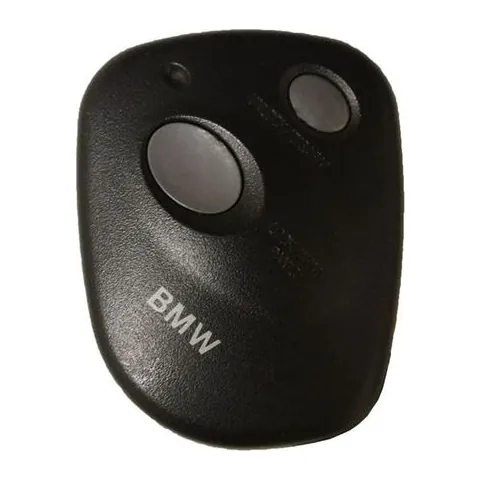
2-button Remote
Find on Amazon- FCC ID
- A269ZUA111
- OE part #
- 700101672, 82-11-1-469-448, 82111469448, 88035-AC230, 88035-AC231, 88036-AE060 +1 more
- Frequency
- 433 MHz
Photos show the OEM part for each number listed. Aftermarket replacements sold online are often slightly different in appearance — the FCC ID, not the shape, is what determines whether a fob will work with your car.
2000 BMW Z3
Remote / key fob programming
This remote can't be programmed with a do-it-yourself procedure. The vehicle needs a diagnostic tool connected to its OBD port to pair a new remote, so a replacement has to be set up by an automotive locksmith or a dealer.
Order the correct replacement remote below — match the FCC ID on your current fob first — then have a local automotive locksmith or the dealer program it to your vehicle.
Key programming
This key fob can't be programmed with a do-it-yourself procedure. The vehicle needs a diagnostic tool connected to its OBD port to pair a new fob, so a replacement has to be set up by an automotive locksmith or a dealer.
Order the correct replacement fob below — match the FCC ID on your current fob first — then have a local automotive locksmith or the dealer program it to your vehicle.
Replacement key fob
Find your key type below, then match the FCC ID printed on the back of your existing fob — or, for a plain transponder key, the blank code — to be sure of the right part.
Remote
A separate key fob that only handles locking and unlocking.
2-button Remote
Find on Amazon- FCC ID
- A269ZUA111
- OE part #
- 700101672, 82-11-1-469-448, 82111469448, 88035-AC230, 88035-AC231, 88036-AE060 +2 more
- Frequency
- 433 MHz
Photos show the OEM part for each number listed. Aftermarket replacements sold online are often slightly different in appearance — the FCC ID, not the shape, is what determines whether a fob will work with your car.
1997–1999 BMW Z3
Remote / key fob programming
This remote can't be programmed with a do-it-yourself procedure. The vehicle needs a diagnostic tool connected to its OBD port to pair a new remote, so a replacement has to be set up by an automotive locksmith or a dealer.
Order the correct replacement remote below — match the FCC ID on your current fob first — then have a local automotive locksmith or the dealer program it to your vehicle.
Key programming
This key fob can't be programmed with a do-it-yourself procedure. The vehicle needs a diagnostic tool connected to its OBD port to pair a new fob, so a replacement has to be set up by an automotive locksmith or a dealer.
Order the correct replacement fob below — match the FCC ID on your current fob first — then have a local automotive locksmith or the dealer program it to your vehicle.
Replacement key fobs
Find your key type below, then match the FCC ID printed on the back of your existing fob — or, for a plain transponder key, the blank code — to be sure of the right part.
Remote Head Key
One piece: a cut metal blade with the lock/unlock buttons built into the head.
3-button Remote Head Key
Find on Amazon- FCC ID
- LX8FZV
- OE part #
- NONOTCH, NOTCHED
- Frequency
- 315 MHz
- Chip
- CHIP: 44
Remote
A separate key fob that only handles locking and unlocking.
2-button Remote
Find on Amazon- FCC ID
- A269ZUA111
- OE part #
- 700101672, 82-11-1-469-448, 82111469448, 88035-AC230, 88035-AC231, 88036-AE060 +2 more
- Frequency
- 433 MHz
Photos show the OEM part for each number listed. Aftermarket replacements sold online are often slightly different in appearance — the FCC ID, not the shape, is what determines whether a fob will work with your car.
- 1997–1999
- CR2016 battery on Amazon
- 2001–2002
- CR2025 battery on Amazon
1997–1999 BMW Z3 key fob battery
Your 1997–1999 BMW Z3 key fob uses a CR2016 3V lithium coin cell. A fresh one typically lasts 3–5 years.
Buy Energizer CR2016 Lithium Coin Batteries (2-pack) on AmazonHow to replace the battery
- 1 Look for a small notch or screw on the side of the fob where the key blade meets the buttons.
- 2 Pry the housing apart with a coin or small flathead (or remove the screw).
- 3 Pop out the old coin cell, noting its orientation.
- 4 Insert the new battery the same way up, then snap the case shut.
- 5 Test the buttons — if they work, you're done.
Battery tips
- Use a fresh, name-brand 3V lithium cell — bargain cells drain quickly.
- Try not to touch both faces of the new battery; skin oils shorten its life.
- If the buttons still don't respond after a new battery, the remote may need re-syncing or programming.
2000 BMW Z3 key fob battery
Your 2000 BMW Z3 key fob uses a CR2032 3V lithium coin cell. A fresh one typically lasts 3–5 years.
Buy Energizer CR2032 Lithium Coin Batteries (4-pack) on AmazonHow to replace the battery
- 1 Find the seam or small slot on the edge of the remote.
- 2 Twist a coin or small flathead in the slot to split the case open.
- 3 Remove the old coin cell and note the + side.
- 4 Fit the new battery with the + side matching, then close the case.
- 5 Press a button to confirm the LED lights, then test at the car.
Battery tips
- Use a fresh, name-brand 3V lithium cell — bargain cells drain quickly.
- Try not to touch both faces of the new battery; skin oils shorten its life.
- If the remote still doesn't work after a new battery, it may need re-syncing or programming.
2001–2002 BMW Z3 key fob battery
Your 2001–2002 BMW Z3 key fob uses a CR2025 3V lithium coin cell. A fresh one typically lasts 3–5 years.
Buy Energizer CR2025 Lithium Coin Batteries (4-pack) on AmazonHow to replace the battery
- 1 Look for a small notch or screw on the side of the fob where the key blade meets the buttons.
- 2 Pry the housing apart with a coin or small flathead (or remove the screw).
- 3 Pop out the old coin cell, noting its orientation.
- 4 Insert the new battery the same way up, then snap the case shut.
- 5 Test the buttons — if they work, you're done.
Battery tips
- Use a fresh, name-brand 3V lithium cell — bargain cells drain quickly.
- Try not to touch both faces of the new battery; skin oils shorten its life.
- If the buttons still don't respond after a new battery, the remote may need re-syncing or programming.
We may earn a commission on qualifying purchases made through links on this page, at no extra cost to you. It never affects which product we recommend. Learn more.
Rather hire a pro?
See what it actually costs, broken out by dealer, locksmith, and DIY: