2016 Chevrolet Suburban Key Fob Programming
Updated 2026 Programming, battery & replacement fob
You can program a 2016 Chevrolet Suburban key fob yourself in a few minutes using a working key or remote, no dealer visit needed. Follow the steps below, then check the battery and the correct replacement fob (with FCC ID and part number) if you need a new one.
If your GMC has a regular key ignition, the remote can't be programmed at home — see a locksmith or dealer. If it has push-button start, you can program it: use the first method if you have a working remote, the second if you don't.
Before you start
- All remote transmitters — working and new
- Ignition OFF to start
Push-button start — with a working remote
- 1With the ignition OFF, pull the metal key blade out of your working remote (press the release button on the front) and place the remote in the cupholder.
- 2Insert the key blade into the driver's-door lock (use the trunk lock on 2-door vehicles) and turn to unlock 5 times within 10 seconds. The display shows READY TO LEARN ELECTRONIC KEY #2, 3, 4...
- 3Place the new remote in the center-console transmitter pocket (remove the storage tray to reach it).
- 4Press the ignition button. When learned, the display is ready for the next remote.
- 5Remove the new remote and press Unlock or Lock. Repeat the last three steps for each remote, then press and hold the ignition 5 seconds to exit and test.
Push-button start — with no working remote
About 30–35 minutes; not available in Canada. Have the key blade cut first.
- 1With the ignition OFF, insert the key blade into the driver's-door lock (trunk lock on 2-door vehicles) and turn to unlock 5 times within 10 seconds. The display shows REMOTE LEARN PENDING, PLEASE WAIT.
- 2Wait 10 minutes until it shows PRESS ENGINE START BUTTON TO LEARN, then press the ignition (it shows REMOTE LEARN PENDING again).
- 3Repeat the previous step two more times. After the third, all previous remotes stop working and the display shows READY FOR REMOTE #1.
- 4Place the new remote in the center-console transmitter pocket (remove the storage tray to reach it).
- 5Press the ignition button. When learned, the display is ready for the next remote.
- 6Remove the remote and press Unlock or Lock. Repeat the last three steps for each remote, then press and hold the ignition 5 seconds to exit and test.
Replacement key fobs
Find your key type below, then match the FCC ID printed on the back of your existing fob — or, for a plain transponder key, the blank code — to be sure of the right part.
Proximity Key
2 versionsStays in your pocket — the car unlocks and starts without inserting a key.
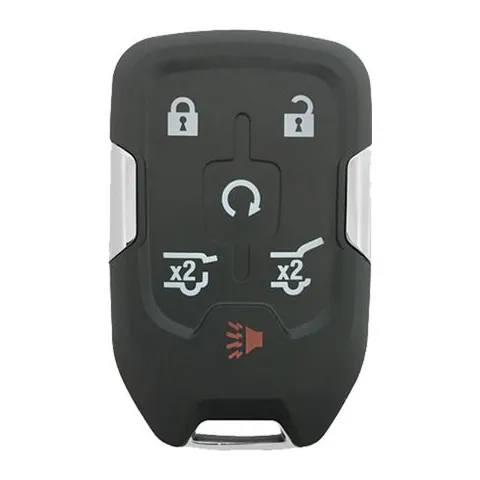
6-button Proximity Key
Find on Amazon- FCC ID
- HYQ1AA
- OE part #
- 13508278, 13508280, 13529634, 13580802, 13580804, 5942490 +1 more
- Frequency
- 315 MHz
- Chip
- PHILIPS ID 46
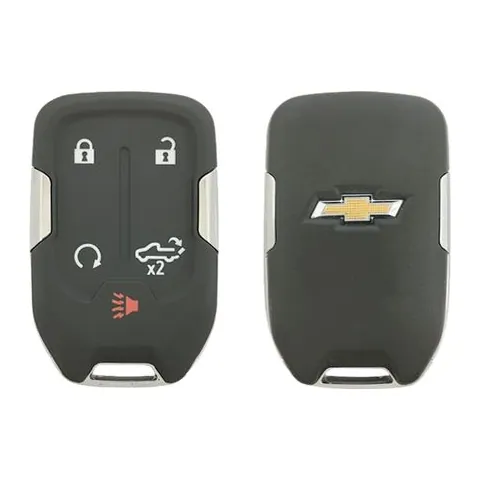
6-button Proximity Key
Find on Amazon- FCC ID
- HYQ1EA
- OE part #
- 13508282, 13508283, 13529633, 13580806, 13580808, 5944133
- Frequency
- 433 MHz
- Chip
- PHILIPS ID 46
Remote
2 versionsA separate key fob that only handles locking and unlocking.
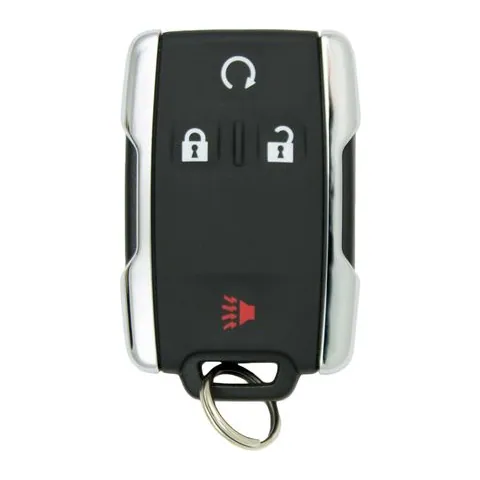
4/5/6-button Remote
Find on Amazon- FCC ID
- M3N-32337100
- OE part #
- 13577766, 13577767, 13577768, 13577769, 13577770, 13580081 +17 more
- Frequency
- 315 MHz
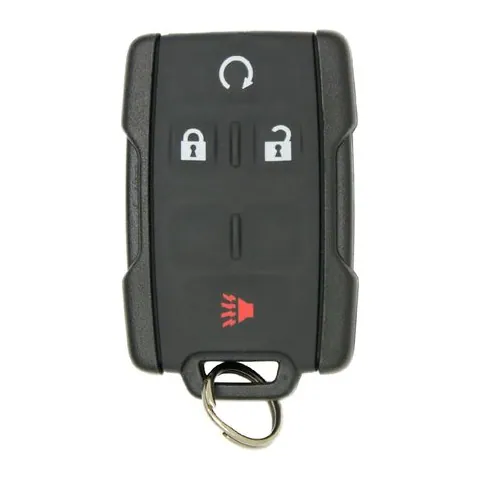
5/6-button Remote
Find on Amazon- FCC ID
- M3N-32337200
- OE part #
- 13577760, 13577761, 13577762, 13580079, 84540861, 84540862 +1 more
- Frequency
- 433 MHz
Photos show the OEM part for each number listed. Aftermarket replacements sold online are often slightly different in appearance — the FCC ID, not the shape, is what determines whether a fob will work with your car.
2016 Chevrolet Suburban key fob battery
Your 2016 Chevrolet Suburban key fob uses a CR2032 3V lithium coin cell. A fresh one typically lasts 3–5 years.
Find CR2032 batteries on AmazonHow to replace the battery
- 1 Slide the release latch and pull the metal emergency key out of the fob.
- 2 Use that key (or a coin) to pry the two halves apart at the seam.
- 3 Lift out the old coin cell — note which side faces up.
- 4 Drop in the new battery the same way (printed + side usually faces the back cover).
- 5 Press the case back together until it clicks, then test lock/unlock and push-to-start.
Battery tips
- Use a fresh, name-brand 3V lithium cell — bargain cells drain quickly.
- Even with a dead fob battery you can usually still start the car by holding the fob against the start button — check your owner's manual.
- If the fob still won't work after a new battery, it may need re-syncing or programming.
We may earn a commission on qualifying purchases made through links on this page, at no extra cost to you. It never affects which product we recommend. Learn more.
Rather hire a pro?
See what it actually costs, broken out by dealer, locksmith, and DIY: